
Why a Simple Invoice Generator Beats Complicated Billing Software
TL;DR: A Simple Invoice Generator gets you from blank screen to paid invoice faster than bloated billing suites ever will. PayToMe’s free generator proves simplicity and professionalism aren’t opposites — unlimited invoices, full branding, and built-in payment links, minus the learning curve.Quick Comparison: Simple Generator vs. Complicated Billing Software
| Factor | Simple Invoice Generator | Complicated Billing Software |
|---|---|---|
| Setup Time | Minutes | Days to weeks |
| Learning Curve | None | Training required |
| Cost | Free (PayToMe) | $20–$60+/month |
| Features You’ll Use | All of them | Maybe 20% |
| First Invoice Sent | Today | After onboarding |
| Payment Links | Built in | Often an add-on |
| Best For | Getting paid | Enterprise accounting teams |
The Bloated Software Problem Nobody Talks About
Here’s a quiet truth from the small business world: most billing software is built for accountants, then marketed to everyone else.
The result? Freelancers wrestling with chart-of-accounts setups they’ll never need. Contractors clicking through five menus to send one invoice. Small business owners paying $50 a month for dashboards, modules, and reports they’ve opened exactly once.
Complexity has a cost. And it’s not just the subscription fee.
Every extra field, every buried setting, every “configure this before you start” screen adds friction between you and the only thing that matters: getting paid. Meanwhile, the U.S. Small Business Administration keeps flagging administrative overload as one of the top productivity drains for small firms.
A Simple Invoice Generator flips the equation. Strip away what you don’t need. Keep what gets you paid. Done.
What a Simple Invoice Generator Actually Does
A Simple Invoice Generator focuses on one job: turning your work into a professional, payable invoice in the least time possible.
Enter your details. Add line items. Customize your branding. Send. The tool handles numbering, tax math, totals, and delivery automatically — no accounting degree, no onboarding call, no 40-page help center.
That’s the entire pitch. And for most freelancers, contractors, and small businesses, it covers 100% of what they actually need from billing.
Simple Doesn’t Mean Stripped-Down: The PayToMe Standard
Here’s where skeptics push back: “Simple tools look cheap. My invoices need to look professional.”
Fair concern. Wrong conclusion.
PayToMe’s Simple Invoice Generator is proof that a simple invoice maker can produce documents that look anything but basic:
- Logo, company stamp, and signature uploads — three branding layers most complicated suites don’t even offer
- Clean, professional simple invoice format — structured fields, automatic calculations, polished output
- Payment links built in — credit card, debit card, or bank account, with optional tips, split payments, and installments
- Text and email delivery — invoices land where clients actually look
- Unlimited free invoices — no caps, no feature ransom
- PDF export — records for you, copies for your accountant
- Edit and resend anytime — fix details from your dashboard in seconds
- Automated reminders and recurring billing — follow-up without the chase
Behind the simplicity sits enterprise-grade infrastructure. PayToMe is built on partnerships with Plaid, Stripe, NVIDIA, IBM, and Silicon Valley Bank — the same backbone powering major FinTech platforms. Simple on the surface. Serious underneath.
Start free at www.paytome.co/invoice-generator.
How to Write a Simple Invoice in 4 Steps
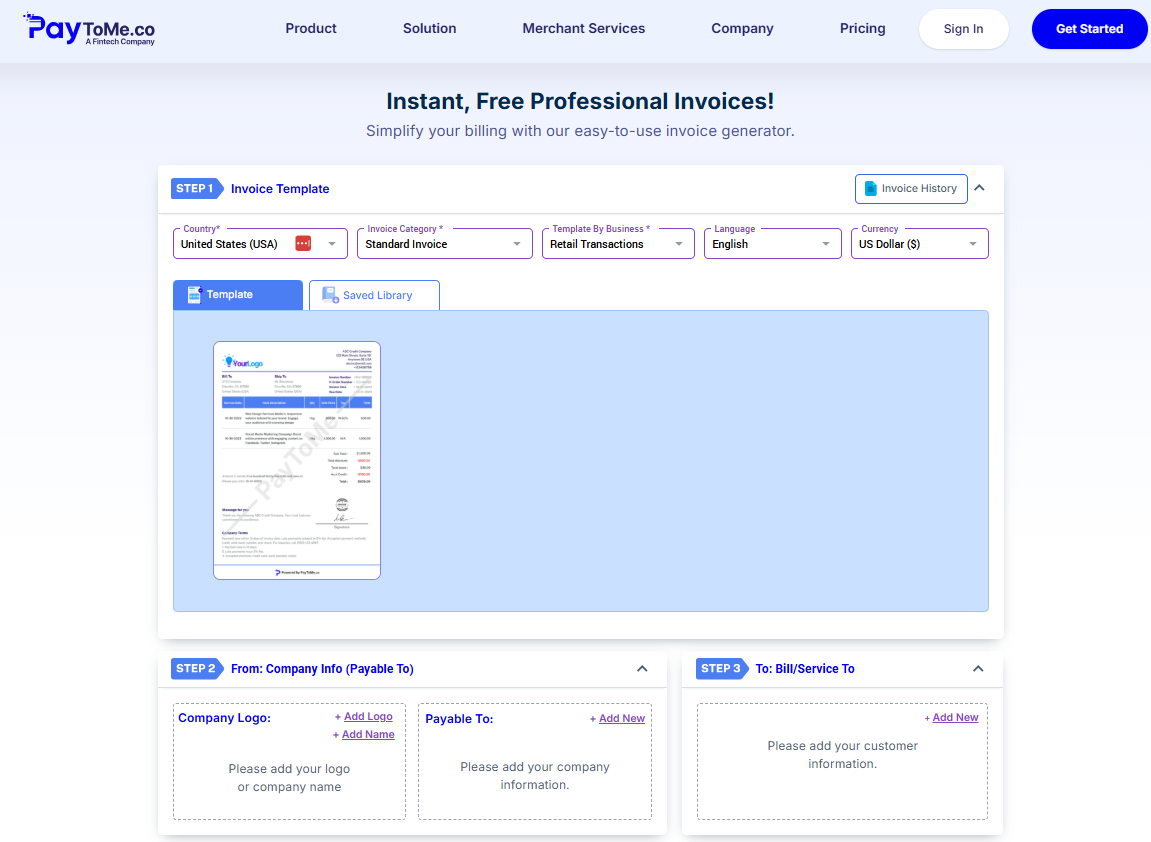
Wondering how to write a simple invoice that still looks professional? Here’s the complete PayToMe flow:
Step 1: Enter Invoice Information
Company details, client details, dates, and line items. Invoice numbers generate sequentially — no duplicates, no gaps.
Step 2: Preview the Invoice
One screen shows everything. Taxes and totals calculate automatically, so the math is right before anything ships.
Step 3: Customize the Invoice
Upload your logo. Add your stamp and signature if you want the extra polish. Saved once, applied to every future invoice.
Step 4: Add Payment Options
Attach a payment link. Pick the methods you accept. Hit Submit — your client receives the invoice by text or email and pays in clicks.
Total time: under a minute. Total training required: none.
When Complicated Billing Software Actually Makes Sense
Honesty matters here. A basic invoice generator isn’t the answer for everyone.
If you’re running multi-entity accounting, managing inventory across warehouses, processing payroll for fifty employees, or filing consolidated reports for investors — yes, you need a heavier system. QuickBooks, Xero, and their peers exist for good reasons.
But that’s a minority of businesses. If your billing reality is “do work, send invoice, get paid, repeat” — and for most freelancers, consultants, contractors, and small service businesses, it is — then a simple billing software approach wins on every metric that matters: speed, cost, clarity, and adoption.
The best tool isn’t the one with the most features. It’s the one you’ll actually use.
Who Wins Biggest with a Simple Invoice Generator?
- Freelancers — a simple invoice for every project, sent in seconds. PayToMe even offers a dedicated free invoice generator for freelancers.
- First-time business owners — send a professional invoice on day one, no tutorials needed
- Contractors and trades — easy invoice creation from a phone, right at the job site
- Side hustlers — professional billing without professional software costs
- Anyone escaping bloated suites — keep the polish, drop the complexity and the monthly fee
Frequently Asked Questions
What is a Simple Invoice Generator?
It’s a streamlined tool that creates professional invoices with minimal steps — enter details, customize branding, add a payment link, and send. No accounting knowledge required.
How do I write a simple invoice?
Include your business details, client details, invoice number, itemized charges, taxes, total due, and payment instructions. PayToMe structures all of this automatically in four steps.
Is a simple invoice template enough for professional billing?
Yes — if it’s well-designed. PayToMe’s templates include logo, stamp, and signature branding plus automatic calculations, so simple never looks amateur.
What should a simple invoice format include?
Header with branding, unique invoice number, client information, itemized services or products, subtotal, taxes, bold total due, payment terms, and a payment link.
Is PayToMe’s simple invoice maker really free?
Yes. Unlimited invoices, full customization, text and email delivery, and PDF export — all free.
Can a basic invoice generator handle recurring clients?
Yes. PayToMe supports recurring invoices and automated reminders, so repeat billing runs itself.
How is a Simple Invoice Generator different from billing software?
Billing software bundles accounting, payroll, inventory, and reporting — with setup and costs to match. A Simple Invoice Generator does one thing fast: professional invoices that get paid.
Can clients pay directly from a simple invoice?
Yes. PayToMe embeds payment links supporting credit card, debit card, or bank account — plus optional tips, split payments, and installments.
Do I need to install anything?
No. PayToMe runs entirely in your browser on any device — desktop, tablet, or phone.
Is my data secure with PayToMe?
Yes. Encrypted gateways, KYC/KYB verification, and partnerships with Plaid, Stripe, NVIDIA, IBM, and Silicon Valley Bank deliver enterprise-grade security.
Final Word
Complicated billing software asks you to become a part-time accountant. A Simple Invoice Generator asks you for sixty seconds.
For most small businesses, that’s the whole decision. You don’t need modules. You don’t need onboarding. You need a professional invoice in your client’s inbox — with a payment link they’ll actually click.
PayToMe delivers exactly that: unlimited free invoices, logo and signature branding, text and email delivery, flexible payments, and enterprise-grade security backed by Plaid, Stripe, NVIDIA, IBM, and Silicon Valley Bank.
Skip the complexity. Create your first invoice free at www.paytome.co/invoice-generator.