
How to Make an Invoice That Gets You Paid Faster
Knowing how to make an invoice is one thing—making one that actually accelerates payment is quite another. Many small businesses and freelancers deliver work on time, but end up waiting weeks to see their cash. What’s missing is clarity, convenience, and follow-through.
In this article, I’ll show you how to make an invoice using PayToMe.co (step-by-step) that compels your clients to act—plus explain why poorly done invoices slow payments, and why PayToMe is built to fix those bottlenecks.
Why Invoicing Still Slows Down Payments
Even today, many invoices get delayed—despite all the digital tools available. Why? Here are common causes, with researched backing.
1. Incomplete or Unclear Invoices
If your invoice lacks details—no invoice number, missing line‑items, no payment terms—your client’s accounting team has to waste time chasing clarifications. One source notes that inconsistency and incomplete invoices are among the top reasons payments stall.
2. Poor Follow-Up and Forgotten Reminders
Even excellent invoices don’t always get paid on time if they disappear into a cluttered inbox. Many businesses don’t enforce a systematic follow-up schedule. Chaser reports that 87% of businesses experience late payments, and much of it is due to failure in consistent reminders.
3. Limited Payment Options
When clients only have one way to pay (for example, check by mail), it creates friction. If you don’t offer invoice payment online or multiple payment paths, you’re forcing them to jump over hoops.
4. Internal Approval Delays
Within client organizations, invoices often pass through multiple checks—finance, procurement, legal—before being approved. If your invoice doesn’t match what they expect (format, terms, references), it gets sent back.
5. Cash Flow & Priority Issues
Sometimes, clients delay payment because of their own bookkeeping cycles or cash shortages. Late payments are often not personal—they’re often pragmatic. According to Xero, small businesses frequently receive payments 9–10 days after due date on average.
How to Make an Invoice (with PayToMe) That Gets You Paid Faster
Here’s a step-by-step workflow—refined to help your invoice get paid faster, not just sent.
Step 1: Create the Invoice
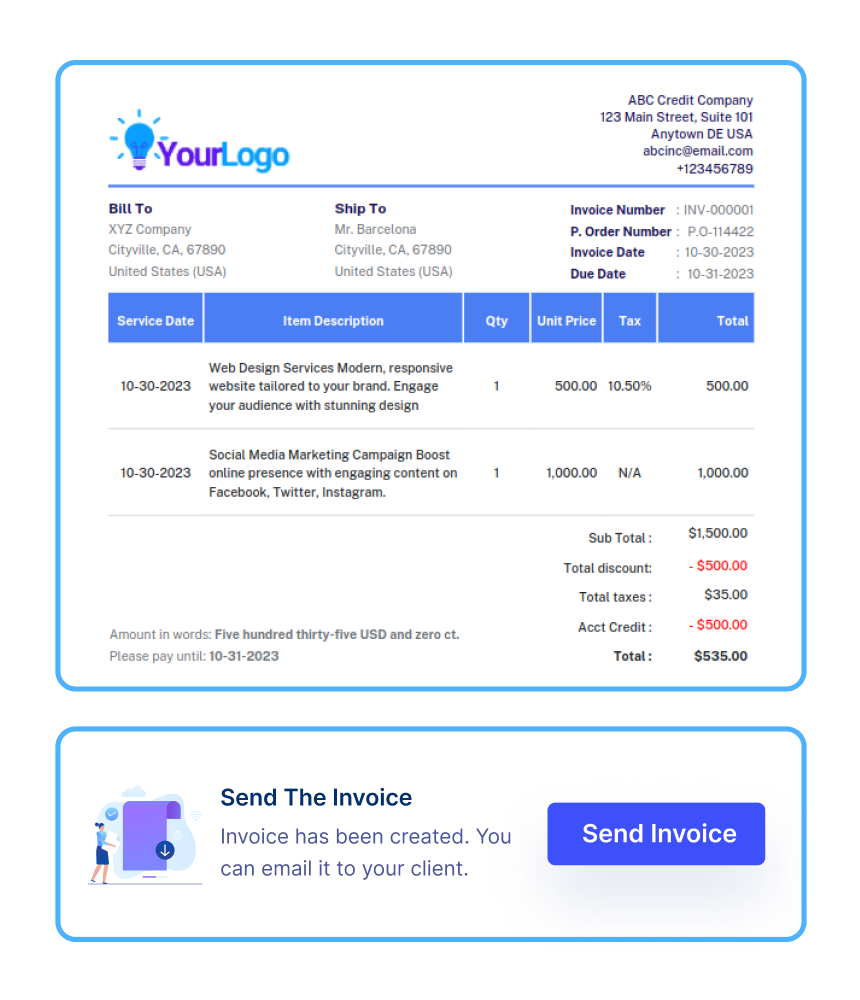
- Log in to PayToMe.co dashboard → “Create Invoice”
- Fill out your business details, customer info, invoice title/number, issue & due date
- Add line items: product/service name, description, quantity, rate, tax
- Add any discounts, terms, and notes
Step 2: Customize Branding & Layout
Apply your logo, color theme, and preferred invoice design. A polished, branded invoice signals professionalism and trust.
Step 3: Offer Multiple Payment Options
Enable payment methods you support: credit cards, ACH (via Plaid), digital wallets, or even check/digital check. With Stripe and Silicon Valley Bank integration, PayToMe handles payment processing securely behind the scenes.
Step 4: Send via Multiple Channels
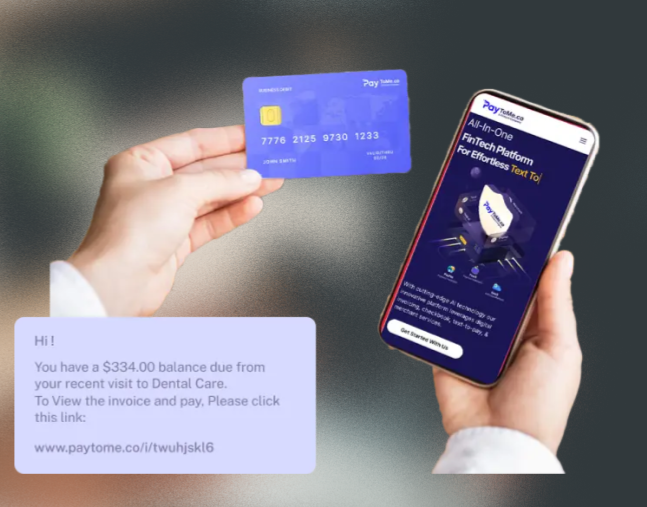
You can send your invoice via:
- SMS (text with link)
- Customer portal
Each invoice carries a payment link, so your client can pay right from the message.
Step 5: Configure Automated Follow-Ups
Schedule reminder messages: a gentle nudge before due date, another on due date, and a final notice if overdue. You pick the timing, tone, and frequency.
Step 6: Monitor and Reconcile
Log into your PayToMe dashboard to view invoice status: Sent, Viewed, Paid, Overdue. Use built-in reports to reconcile payments, view trends, and export data.
This complete flow means your invoice doesn’t just sit in limbo—it actively works to get paid.
Why Choose PayToMe for Invoicing?
Here are the key advantages that make PayToMe an ideal choice—especially compared to using generic tools or doing it manually.
Full Payment Ecosystem
With PayToMe, you don’t just send invoices—you manage payments end to end. From sending to tracking to reconciliation, everything lives in one system. No switching between tools.
Multi-Channel Delivery
Some clients prefer SMS, others email, others portal access. PayToMe supports all three, so you don’t force clients into a channel they don’t prefer.
Deep Integration & Security
We partner with Plaid, Stripe, Nvidia, IBM, and Silicon Valley Bank so that your payments are secure, banking connections are seamless, and fraud detection is robust.
Automation That Saves Time
You don’t want to babysit your invoices. Automated reminders, repeat templates, and tracking remove the legwork so you can focus on your core business.
Professional Polished Invoices
You get branding, clean layouts, and consistent formatting—all of which reduce friction and build confidence with clients.
Analytics & Reporting
You can view dashboards, generate financial reports, see aging receivables, forecast revenue, and export for accounting systems. That kind of insight is often missing in simple invoice tools.
FAQs: Making Invoices That Get Paid Faster
How can I make an invoice without mistakes?
Use PayToMe’s templates. Enter client and line-item data, set terms, and preview before sending.
What if my client wants to pay by check?
You can offer that option—Mail a digital check or generate a physical one via PayToMe’s tool.
Do I need technical skills or developer support?
No. PayToMe’s tools are designed for non-technical users. The interface is intuitive and guided.
Can I send invoices internationally?
Yes. PayToMe supports multi-currency invoicing and localized payment gateways.
Will clients know if I send reminders?
Yes. Reminders are part of the agreed billing process; they’re polite, scheduled, and clearly labeled as payment notices.
Does PayToMe integrate with accounting software?
Yes—you can export data or sync with tools like QuickBooks, Xero, or custom accounting systems.
Final Thoughts
If you’ve ever wondered how to make an invoice that actually gets paid—quickly and efficiently—the answer lies in the process.
PayToMe simplifies the journey from creation to collection. With flexible delivery methods, multiple payment options, real-time tracking, and secure partnerships with Plaid, Stripe, IBM, and others—you’re no longer chasing payments. You’re managing them like a pro.