
How to Make an Invoice Online and Send It Instantly
Make an invoice online—that’s no longer just a convenience for businesses. It’s how companies get paid faster, reduce follow-ups, and keep cash flow predictable. Whether you’re a freelancer billing clients, a small business owner managing recurring invoices, or a growing company handling multiple customers, learning how to make an invoice online and send it instantly can save serious time.
The shift away from paper invoices and static PDFs isn’t about trends. It’s about speed, clarity, and getting paid without friction.
Why Making an Invoice Online Works Better Than Traditional Billing
Traditional invoicing slows everything down. Invoices get buried in inboxes, details are missed, and payment instructions aren’t always clear. That’s where delays begin.
When you make an invoice online, everything changes:
- Invoices are delivered instantly
- Payment options are clear and accessible
- Invoice status is easy to track
- Clients can pay in just a few clicks
For a small business invoice or a freelance invoice, digital invoicing removes unnecessary back-and-forth and improves the overall payment experience.
What You Need Before You Make an Invoice Online
Before creating your invoice, it helps to prepare a few essentials:
- Business name and contact details
- Client information
- Invoice date and due date
- Clear list of products or services
- Payment terms
Once these are ready, an invoice generator handles formatting and delivery.
How to Make an Invoice Online Using PayToMe
If you want a simple, reliable way to make an invoice online and send it instantly, PayToMe.co offers an all-in-one invoicing and payment platform built for modern businesses.
Step 1: Create an Invoice with an Invoice Generator
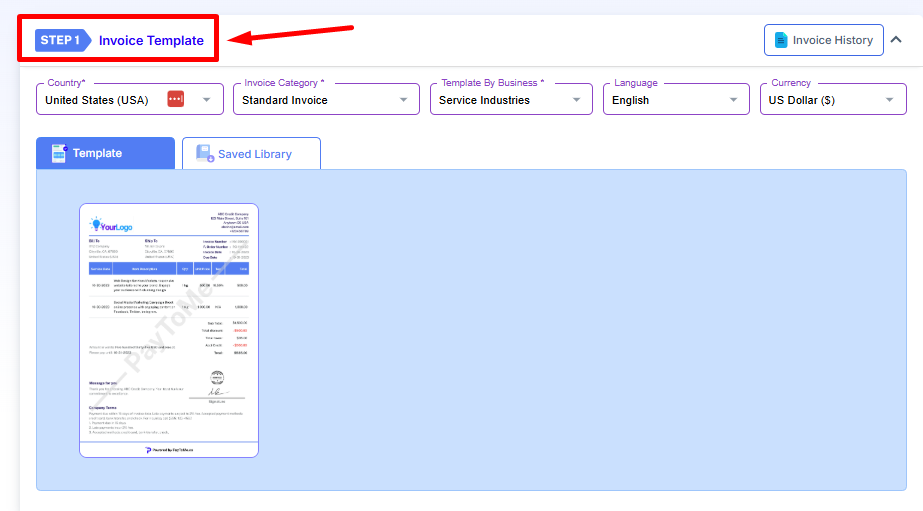
Using PayToMe’s invoice generator, you can create an invoice in minutes. The platform follows a clean invoice format and provides ready-to-use invoice templates, so you don’t have to worry about design or structure.
This makes it easy to create an invoice that looks professional every time.
Step 2: Customize Your Digital Invoice
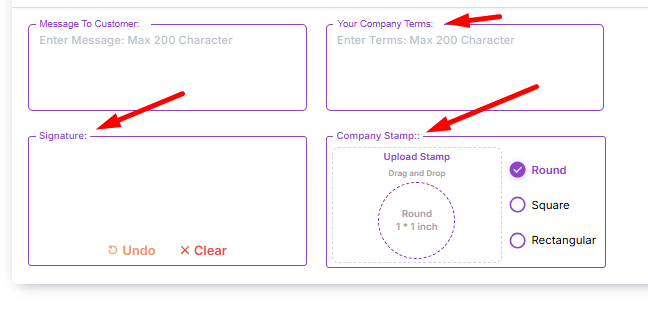
A digital invoice should reflect your brand. PayToMe allows you to add logos, business details, and signatures so your invoice feels polished and trustworthy. This small detail often improves response and payment speed.
Step 3: Preview and Send the Invoice Online Instantly
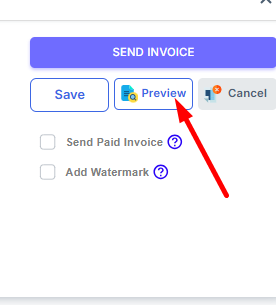
Once the invoice is ready, you can preview it and send invoice online through:
- SMS using Text to Pay
- A secure payment link
This flexibility ensures your invoice reaches the client through the fastest channel.
Step 4: Enable Instant Invoice Payment
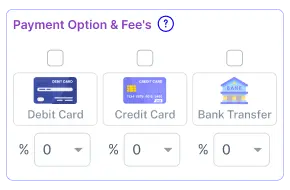
When you make an invoice online with PayToMe, payment options are built in. Clients can complete invoice payment directly from the invoice using cards or bank transfers, without downloading files or logging into separate systems.
Fewer steps mean faster payments.
How to Send Invoices with Text Messaging (SMS)
One of the fastest ways to get paid is by sending invoices through text messaging.
With PayToMe, you can send an instant invoice link directly to your client’s phone.
How it works:
- Create your invoice using the invoice generator
- Add the correct phone number for your client
- Save all invoice items carefully
- Click “Submit”
Once submitted, your client receives the invoice as a text message with a secure payment link. This method works especially well for service businesses, on-the-go clients, and situations where email responses are slow.
Sending invoices via SMS often results in faster invoice payment because the message is seen immediately.
How to Send Invoices via Email
Email invoicing is still preferred by many clients, especially for formal billing or record-keeping.
PayToMe makes it simple to send invoices online through email without extra steps.
How it works:
- Generate your invoice using PayToMe’s invoice generator
- While filling out “Bill / Service To,” enter the client’s email address
- Click “Submit”
Your client receives the online invoice directly in their inbox, ready to review and pay. This approach keeps invoicing professional while still being efficient.
Why Digital Invoices Get Paid Faster
A digital invoice removes friction. Clients don’t have to search for payment details or ask follow-up questions. Everything they need is right there.
Businesses that switch to online invoice software often see:
- Fewer unpaid invoices
- Faster approvals
- Less time spent on payment follow-ups
For service providers and freelancers, this alone can dramatically improve cash flow.
Secure Technology Behind Online Invoicing
Security matters when handling invoices and payments. PayToMe is built on trusted financial and enterprise-grade infrastructure.
- Payments are processed through Stripe, a globally trusted payment processor
- Bank connections are secured using Plaid
- Platform reliability and scalability are powered by Amazon Web Services (AWS)
- Enterprise technology support is backed by IBM
- Financial services alignment includes institutions like Silicon Valley Bank
These integrations ensure that when you make an invoice online, your data and transactions remain secure and compliant.
Who Should Use Online Invoice Software?
Online invoicing works especially well for:
- Small businesses sending recurring invoices
- Freelancers billing remote clients
- Agencies managing multiple projects
- Growing companies that want automated billing
If you’re still relying on spreadsheets or static invoice examples, switching to invoice software can save hours every month.
Frequently Asked Questions on How to Make an Invoice Online
What does it mean to make an invoice online?
It means creating and sending a digital invoice using invoice software instead of paper or manual documents.
Can I send invoices instantly after creating them?
Yes. Once you make an invoice online, it can be sent immediately via email, SMS, or payment link.
Is online invoicing suitable for freelancers?
Absolutely. A freelance invoice created online looks professional and helps get paid faster.
How do clients pay online invoices?
Clients can pay directly from the invoice using integrated payment options, without extra steps.
Is PayToMe suitable for small businesses?
Yes. PayToMe is designed to support small business invoicing while scaling as your business grows.
Final Thoughts
Knowing how to make an invoice online isn’t just about convenience—it’s about control. Digital invoicing helps businesses send invoices faster, reduce payment delays, and focus on growth instead of chasing payments.
Platforms like PayToMe.co bring invoice creation, instant delivery, and secure payments together in one place, making invoicing work for your business—not against it.
If you’re ready to stop waiting on invoices and start getting paid faster, moving online is the smart next step.