
How to Create Payment Link in Minutes with PayToMe
TL;DR: Wondering how to create payment link for your business? With PayToMe, you create an invoice, send it by SMS or email, and your customer receives a secure payment link they can pay in taps — no coding, no customer login, no cost to start.
Quick Snapshot: Payment Links with PayToMe
| Feature | What You Get |
|---|---|
| Creation Method | Invoice-based — every link carries full billing context |
| Delivery | Text message (SMS) or email |
| Customer Login | None required — click and pay |
| Payment Methods | Credit/debit cards, bank transfers, Apple Pay, Google Pay |
| Flexibility | Tips, split payments, installments, partial payments |
| Speed | Payments process in seconds; funds in your bank within 2 days |
| Coding Required | Zero — fully no-code |
| Cost to Start | Free |
Why Payment Links Are Replacing “Send Me Your Card Details”
A client owes you $450. What happens next?
In the old world: you email bank details, they forget, you follow up, they ask for an invoice, you send a PDF, they promise to “get to it this week.” Two weeks vanish.
In the new world: you send one link. They tap it. They pay. Done before your coffee cools.
That’s the entire promise of a payment link — a secure URL that takes your customer straight to checkout, from any device, without accounts or apps. And learning how to create payment link workflows for your business is one of the fastest cash-flow upgrades available in 2026. No developer. No website changes. No waiting.
Here’s exactly how to do it.
What Is a Payment Link?
A payment link is a shareable URL that opens a secure checkout page. Your customer clicks it, sees what they owe, picks a payment method, and pays — from their phone, laptop, anywhere.
What makes PayToMe’s approach distinctive: every online payment link is generated from an invoice. That means the link your customer receives isn’t an anonymous “pay me $450” request. It arrives with your logo, itemized charges, and payment terms attached — full context that builds trust and removes the hesitation that kills conversions on naked links.
One workflow. Professional invoice. Instant payment link. Both delivered together.
How to Create Payment Link with PayToMe: 4 Steps

Here’s the complete process, start to finish:
Step 1: Create Your Invoice
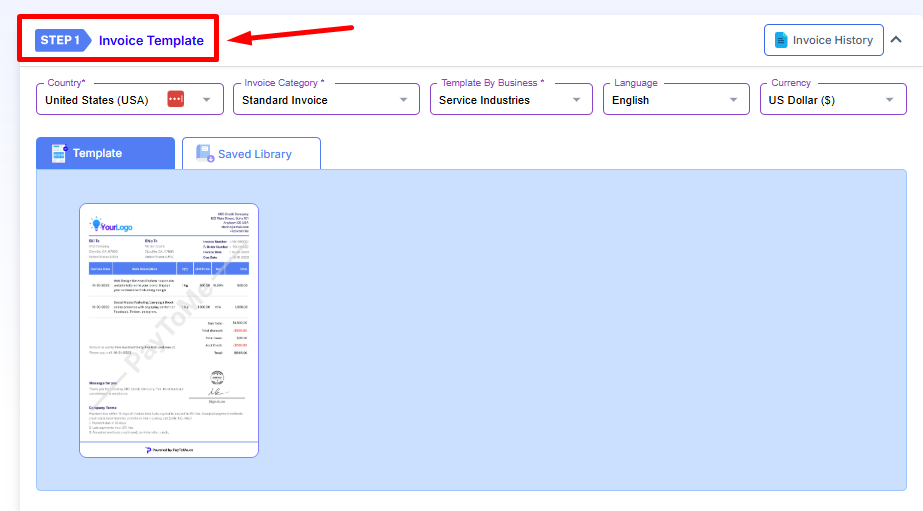
Head to PayToMe’s free invoice generator. Enter your company details, client details, dates, and line items. Add your logo, stamp, or signature for extra polish. Taxes and totals calculate automatically.
Step 2: Add the Payment Link
Use the “Add Payment Link” option and choose which payment methods you accept — credit card, debit card, or bank account. Want flexibility? Enable tips, split payments, installments, or partial payments right here.
Step 3: Send via SMS or Email
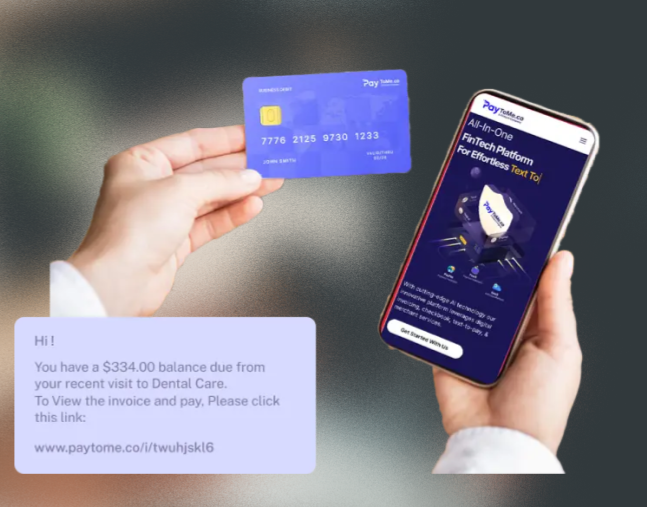
Add your customer’s phone number to send a payment link via text, or use the email option while filling in “Bill/Service To” details. Either way, your customer receives the invoice with the payment request link embedded.
Step 4: Get Paid
Your customer clicks the link and pays — no login credentials needed. The payment processes within seconds, you get an instant notification, and funds land in your bank account within 2 days.
Total time to create payment link and send it: under two minutes. Coding knowledge required: none.
What Makes PayToMe’s Payment Links Different
Plenty of tools generate links. Here’s what separates PayToMe:
- Patented Text-to-Pay technology — PayToMe’s Text-to-Pay delivers your instant payment link straight to customer phones, worldwide
- Invoice-first structure — every link carries branding, itemization, and terms, not just an amount
- No-code payment link generator — built for business owners, not developers
- Four flexibility options — tips, split payments, installments, and partial payments on any link
- Broad payment support — cards, bank transfers, Apple Pay, and Google Pay
- No customer login — the single biggest conversion killer, eliminated
- Free payment link creation — start at zero cost with transparent processing fees (typically 1%–3% per transaction)
- Fast settlement — funds in your bank within 2 days
Behind it all sits enterprise-grade infrastructure. PayToMe is built on partnerships with Plaid, Stripe, NVIDIA, IBM, and Silicon Valley Bank — the same backbone powering major FinTech platforms.
Start free at www.paytome.co/payment-links.
Who Should Use Payment Links?
A payment link for small business use fits almost any billing scenario, but these cases shine brightest:
- Service providers — salons, spas, home services: invoice and collect without chasing
- Freelancers and consultants — professional payment request links that match premium positioning
- Restaurants — contactless payment without waiting for the check
- Retailers — quick checkout links for phone and social-media orders
- Event organizers — ticket sales and registrations by simple text
If your customers have a phone, you have a payment channel.
Best Practices: How to Send a Payment Link That Gets Paid Fast
Creating the link is half the job. Getting it clicked is the other half:
- Send by SMS when speed matters — texts get opened in minutes; emails can sit for days
- Send the link the moment work completes — urgency fades fast
- Keep the invoice itemized — clarity kills disputes before they start
- Enable multiple payment methods — every option you add removes a reason to delay
- Offer installments on larger amounts — flexibility converts hesitant payers
- Let automation handle reminders — PayToMe nudges politely so you never have to
Frequently Asked Questions
How do I create a payment link for free?
With PayToMe, create an invoice using the free invoice generator, click “Add Payment Link,” choose your accepted payment methods, and send by SMS or email. Free to start.
How to create payment link without a website?
You don’t need one. PayToMe’s payment links work independently of any website — create the invoice, attach the link, and deliver it straight to your customer’s phone or inbox.
How do customers pay through a payment link?
They click the link, view the invoice, choose a payment method — credit card, debit card, bank transfer, Apple Pay, or Google Pay — and pay. No account or login required.
Can I send a payment link via email?
Yes. PayToMe offers a payment link via email option while you’re adding “Bill/Service To” details on the invoice. SMS delivery is available too.
What is the fastest way to send payment link requests?
Text message. PayToMe’s patented Text-to-Pay technology delivers links directly to customer phones, and most texts get opened within minutes.
Are payment links safe?
Yes — with the right provider. PayToMe uses encrypted gateways, KYC/KYB verification, and partnerships with Plaid, Stripe, NVIDIA, IBM, and Silicon Valley Bank for enterprise-grade security.
How much does a payment link cost?
Creating and sending links with PayToMe is free. Standard processing fees apply per transaction, typically ranging from 1% to 3%.
How fast do I receive my money?
Payments process within seconds, and PayToMe transfers funds to your bank account within 2 days.
Can customers split payments or pay in installments?
Yes. PayToMe supports split payments, installments, partial payments, and even tips on any payment link.
Do payment links work internationally?
Yes. PayToMe’s Text-to-Pay system delivers payment links to customer phones worldwide.
Final Word
Knowing how to create payment link workflows isn’t a technical skill anymore. It’s a two-minute task: create the invoice, attach the link, send by text or email, get paid.
No developers. No website. No customer logins. Just the shortest possible distance between finished work and money in your account — with tips, installments, and split payments built in when you need them.
PayToMe makes the whole flow free to start, backed by patented Text-to-Pay technology and enterprise-grade security from Plaid, Stripe, NVIDIA, IBM, and Silicon Valley Bank.